SAP NetWeaver Requirements - DSS 6 | Data Source Solutions Documentation
Documentation: SAP NetWeaver Requirements - DSS 6 | Data Source Solutions Documentation
SAP NetWeaver Requirements
This section describes the requirements, access privileges, and other features of Data Source Solutions DSS when using SAP NetWeaver for replication.
Supported Platforms
- Learn about the SAP NetWeaver versions compatible with DSS on our Platform Support Matrix page (6.1.0, 6.1.5, 6.2.0, and 6.2.5).
Supported Capabilities
- Discover what DSS offers for SAP NetWeaver on our Capabilities for SAP NetWeaver on HANA and Capabilities for SAP NetWeaver on Oracle page (6.1.0, 6.1.5, 6.2.0, and 6.2.5).
Data Management
- Learn how DSS maps data types between source and target DBMSes or file systems on the Data Type Mapping page. For the list of the supported SAP NetWeaver data types and their mapping, see Data Type Mapping for SAP NetWeaver.
Data Source Solutions provides additional solutions for replicating data from SAP database. For more information, see section SAP in Databases.
Introduction
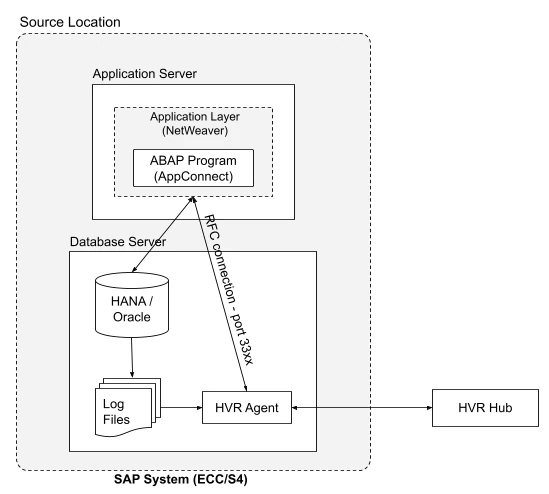
DSS allows you to capture changes from SAP ECC or S/4 system on Oracle or SAP HANA where you do not have a full use database license. The connection to the database is established indirectly via the SAP's application layer (NetWeaver).
DSS connects to SAP NetWeaver using the SAP’s native Remote Function Call (RFC) libraries and then calls the DSS specific ABAP functions (also called as AppConnect) to start the data extraction process. DSS's AppConnect is used for all communication (metadata queries, adding tables to a channel, Refresh, and Compare. All data transport is done in compressed format via RFC. For more information about the ports for RFC, refer to the SAP documentation.
Prerequisites
The following are required for DSS when using SAP NetWeaver for replication:
- SAP ABAP version 7.5 and above.
- SAP system must be unicode.
- Oracle or SAP HANA database.
License for SAP NetWeaver
The regular license does not allow you to use the location type SAP NetWeaver, so an additional license is needed. Contact DSS Support to obtain the proper license for using DSS with SAP NetWeaver.
DSS supports multi-licensing, where multiple license files are added for a system.
SAP NetWeaver User Permissions
To connect to SAP Netweaver, DSS requires a SAP Communication user. This user must be granted the following authorizations:
RFC Access to Standard SAP Functions
Required to establish the RFC connection and perform system checks.
| AUTHORIZATION OBJECT | AUTHORIZATION FIELD | AUTHORIZATION VALUE |
|----------------------|---------------------|---------------------------------------|
| S_RFC | ACTVT | 16 |
| | RFC_TYPE | FUGR |
| | RFC_NAME | BTCH
RFC1
SDIFRUNTIME |
| AUTHORIZATION OBJECT | AUTHORIZATION FIELD | AUTHORIZATION VALUE | |----------------------|---------------------|---------------------| | S_RFC | ACTVT | 16 | | | RFC_TYPE | FUNC | | | RFC_NAME | RFCPING |
RFC Access to DSS Function Group
Required to allow DSS to call its custom RFC function modules.
| AUTHORIZATION OBJECT | AUTHORIZATION FIELD | AUTHORIZATION VALUE | |----------------------|---------------------|---------------------| | S_RFC | ACTVT | 16 | | | RFC_TYPE | FUGR | | | RFC_NAME | /DSS/SAPAPPCONNECT |
Batch Job Administration
Required for scheduling and managing background jobs.
| AUTHORIZATION OBJECT | AUTHORIZATION FIELD | AUTHORIZATION VALUE | |----------------------|---------------------|---------------------| | S_RFC | ACTVT | 16 | | | RFC_TYPE | FUGR | | | RFC_NAME | S_BTCH_JOB |
| AUTHORIZATION OBJECT | AUTHORIZATION FIELD | AUTHORIZATION VALUE | |----------------------|---------------------|---------------------| | S_BTCH_ADM | BTCADMIN | Y |
| AUTHORIZATION OBJECT | AUTHORIZATION FIELD | AUTHORIZATION VALUE | |----------------------|---------------------|---------------------| | S_BTCH_JOB | JOBACTION | RELE | | | JOBGROUP | * |
Data Access Authorizations
DSS requires database-level authorizations to read SAP NetWeaver application tables and metadata. Depending on your organization’s security policy, you can configure database grants using one of the following methods.
Option 1: Grant Full Access
To simplify configuration, grant access to all tables.
This option is easiest to maintain, but may not meet stricter security policies.
| AUTHORIZATION OBJECT | AUTHORIZATION FIELD | AUTHORIZATION VALUE |
|---|---|---|
| S_TABU_SQL | ACTVT | 33 |
| DBSID | * | |
| TABOWNER | standard DB schema(SAPABAP1) | |
| TABLE | * |
Option 2: Restrict Access and Allow Only Specific Tables
To restrict access, you must grant S_TABU_SQL authorizations for:
- Specific data tables – the application tables you want to replicate.
- ABAP tables - common SAP metadata/control tables
- Database-specific system tables – depending on whether you’re on HANA or Oracle
When granting permissions only to specific data tables, the authorization object S_TABU_SQL must be added to the user profile.
-
Specific Data Tables - Grant access to the individual data tables that you plan to replicate:
| AUTHORIZATION OBJECT | AUTHORIZATION FIELD | AUTHORIZATION VALUE | |----------------------|---------------------|------------------------------| | S_TABU_SQL | ACTVT | 33 | | | DBSID | * | | | TABOWNER | standard DB schema(SAPABAP1) | | | TABLE | Target table name |
-
ABAP Tables - Grant access to ABAP dictionary and control tables for metadata and replication management:
| AUTHORIZATION OBJECT | AUTHORIZATION FIELD | AUTHORIZATION VALUE | |----------------------|---------------------|------------------------------| | S_TABU_SQL | ACTVT | 33 | | | DBSID | * | | | TABOWNER | standard DB schema(SAPABAP1) | | | TABLE | /DSS/BACKUP_CONFIGURATION
/DSS/LOG_PARTITIONS
/DSS/SERVICE_LOG_POSITIONS
/DSS/TABLE_COLUMNS
/DSS/TABLE_VIRTUAL_FILES
/DSS/BACKUP_CATALOG_LOG_FILES
/DSS/BACKUP_PARAMETER_FILE
/DSS/ROOT_KEYS_EXTRACT
DD02L*
DD02T*
DD03L*
DD04L*
DD06T*
DD08L*
DD09L*
DD16S
DDNTF
DDNTT*
DSS_IS_ARCHBLK
DSS_STIN_ARCBLK
TADIR* | -
Database-specific System Tables
NetWeaver on SAP HANA
Grant access to the following SYS schema tables in addition to specific data tables and ABAP tables.| AUTHORIZATION OBJECT | AUTHORIZATION FIELD | AUTHORIZATION VALUE | |----------------------|---------------------|---------------------| | S_TABU_SQL | ACTVT | 33 | | | DBSID | * | | | TABOWNER | * | | | TABLE | CLIENTSIDE_ENCRYPTION_COLUMN_K
CS_ALL_COLUMNS
CS_COLUMNS_
CS_CONCAT_ATTRIBUTES_
CS_TABLES_
DUMMY
HAS_NEEDED_SYSTEM_PRIV
HAS_NEEDED_SYSTEM_PRIV_INCL_SY
INDEX_COLUMNS
M_CONNECTIONS
M_DATABASE
NUMA_NODE_PREFERENCE_
P_DATATYPES_
P_GRANTEDPRIVS_
P_INDEXES_
P_MASK_EXPRESSION_
P_OBJTYPES_
P_PRINCIPALS_
P_PROCEDURES_
P_SCHEMAS_
P_USERS_
RS_COLUMNS_
RS_TABLES_
SERIES_DATA_
TABLES
TABLE_COLUMNS
VIRTUAL_COLUMNS_
VIRTUAL_TABLES_
_SYS_CS_TABLE_COLUMNS
_SYS_GRANTED_OBJECTS
_SYS_GRANTEE_OIDS
_SYS_RS_TABLE_COLUMNS
_SYS_SCHEMAS_WITH_PRIVILEGES_O
_SYS_VIRTUAL_TABLE_COLUMNS |NetWeaver on Oracle
Grant access to the following Oracle dictionary and system objects in addition to specific data tables and ABAP tables.
| AUTHORIZATION OBJECT | AUTHORIZATION FIELD | AUTHORIZATION VALUE | | -------------------- | ------------------- | ------------------- | | S_TABU_SQL | ACTVT | 33 | | | DBSID | * | | | TABOWNER | * | | | TABLE | ALL_OBJECTS
:BF0000
CDEF$
CLU$
CON$
DBA_OBJECTS
DEFERRED_STG$
DEPENDENCY$
DUAL
FILE$
IND$
I_COBJ#
I_CON2
I_DEFERRED_STG1
I_DEPENDENCY1
I_FILE#_BLOCK#
I_FILE2
I_IND1
I_INDPART_OBJ$
I_INDSUBPART_OBJ$
I_LINK1
I_LOB2
I_LOBFRAG$_FRAGOBJ$
INDPART$
INDSUBPART$
I_OBJAUTH1
I_OBJ#
I_OBJ1
I_OBJ2
I_OBJ4
I_OBJ5
I_OLAP_CUBES$
I_SUM$_1
I_TABCOMPART$
I_TABPART_OBJ$
I_TABSUBPART$_OBJ$
I_TRIGGER2
I_TS#
I_UNDO2
I_USER#
I_USER1
I_USER2
LOB$
LOBFRAG$
OBJ$
SEG$
SUM$
SYS_DBA_SEGS
SYS_OBJECTS
TAB$
TABCOMPART$
TABPART$
TABSUBPART$
TRIGGER$
TS$
UNDO$
USER$
USER_EDITIONING$
X$CON
X$DNFS_FILES
X$KCCAL
X$KCCDI
X$KCCDI2
X$KCCFN
X$KCCIC
X$KCCLE
X$KCCLE (IND:1)
X$KCCRT*
X$KGLCURSOR_CHILD
X$KQLFXPL*
X$KRSTDEST
X$KSLED*
X$KSLWT
X$KSPPCV
X$KSPPI
X$KSPPSV
X$KSUSE*
X$KTADM
X$KTCXB
X$KZEKMENCWAL
X$KZSPR
X$KZSRO
X$NLS_PARAMETERS
X$VERSION
VW* |
Configuration
The following must be configured to use DSS with SAP NetWeaver for replication:
Install NetWeaver RFC SDK Libraries
DSS requires NetWeaver RFC SDK version 7.50.8 or above installed on the machine from where DSS connects to the SAP NetWeaver.
-
Go to the SAP software download page.
-
Download and extract the Unicode SAP NetWeaver RFC SDK libraries that are specific to the operating system.
-
Copy the below mentioned files from the /lib directory (available in the extracted path) to any directory of your preference.
Click here for the list of library files to be copied.
OPERATING SYSTEM LIBRARIES Linux 64 bit libicudata.so.xx
libicudecnumber.so
libicui18n.so.xx
libicuuc.so.xx
libsapnwrfc.so
libsapucum.soWindows 64 bit icudtxx.dll
icuinxx.dll
icuucxx.dll
libsapucum.dll
libicudecnumber.dll
sapnwrfc.dll -
For Linux, set the
<b>read</b>,<b>write</b>, and<b>execute</b>permissions for each NetWeaver RFC library files.
Import DSS’s Transports
Import the transports containing DSS’s ABAP functions. Use your company's default method to import the transports provided.
While importing you may need to use the option Ignore Invalid Component Version to suppress import errors.
The transport files are available in the DSS_HOME/dbms/netweaver directory. For information about the latest transports files, refer to the readme.txt available in the same directory.
Configure AppConnect in SAP
DSS's AppConnect has a number of configuration parameters that can be used to tune and optimize the data extraction. These parameters can be accessed via the SAP transaction - /N/DSS/CONFIG.
In most cases, these parameters can be left with the default values. When you need to make a change, trigger a change mode and save new values into variant "ACTIVE".
| PARAMETER | DESCRIPTION |
|---|---|
| Max wait background | Maximum idle runtime for background processes. |
| Max wait foreground | Maximum idle runtime for foreground processes. |
| DB read max wait active | Maximum time spent in active mode in DB read process. |
| DB read max wait passive | Maximum time spent in passive (wait) mode in DB read process. |
| RFC read max wait passive | Maximum time spent in passive (wait) mode in RFC read process. |
| Memory tunnel size | Size of shared memory buffer used in SAP. |
| Max size uncompressed | Maximum data package size. |
| Application server | Name of the dedicated application server. Value for this parameter can be set to NONE, however, it should only be used when instructed by Data Source Solutions support. |
| DB connection name | Secondary database connection name to be used in case you do not want to use the standard SAP database connection. Value for this parameter can be set to DEFAULT, however, it should only be used when instructed by Data Source Solutions support. |
| Activate event log | Activate logging for DB read process (job logs). |
| Activate RFC trace | Activate logging for RFC read processes (application log). |
Limitations
- DSS's AppConnect does not support replicating LOB (BLOB, CLOB, NCLOB) data that is larger than 30k bytes. In case the LOB contains more than 30k bytes, data is silently truncated.
- In versions prior to 6.1.0/3, for NetWeaver on Oracle, DSS does not support unpacking the SAP tables using the parameter SapUnpack in action Transform.