Permissions - DSS 6 | Data Source Solutions Documentation
Documentation: Permissions - DSS 6 | Data Source Solutions Documentation
Permissions
The Permissions tab on the System page displays a list of users and the access permissions assigned to them. Under this tab, you can grant/revoke access permissions to the existing users.
The permissions system allows you to manage the levels of access that hub users have to the DSS Hub System. The actions that a hub user can perform, the features and data exposed to a user are governed by the type of permission a user is assigned.
Only users with the following permissions can manage user access levels:
- SysAdmin: Can manage permissions on any hub in the DSS Hub System.
- HubOwner: Can manage permissions on hubs where they have the HubOwner permission.
Adding Access Permissions to User
To add access permission to all users or a specific user:
-
On the Permissions tab, click Add Access at the top right.
-
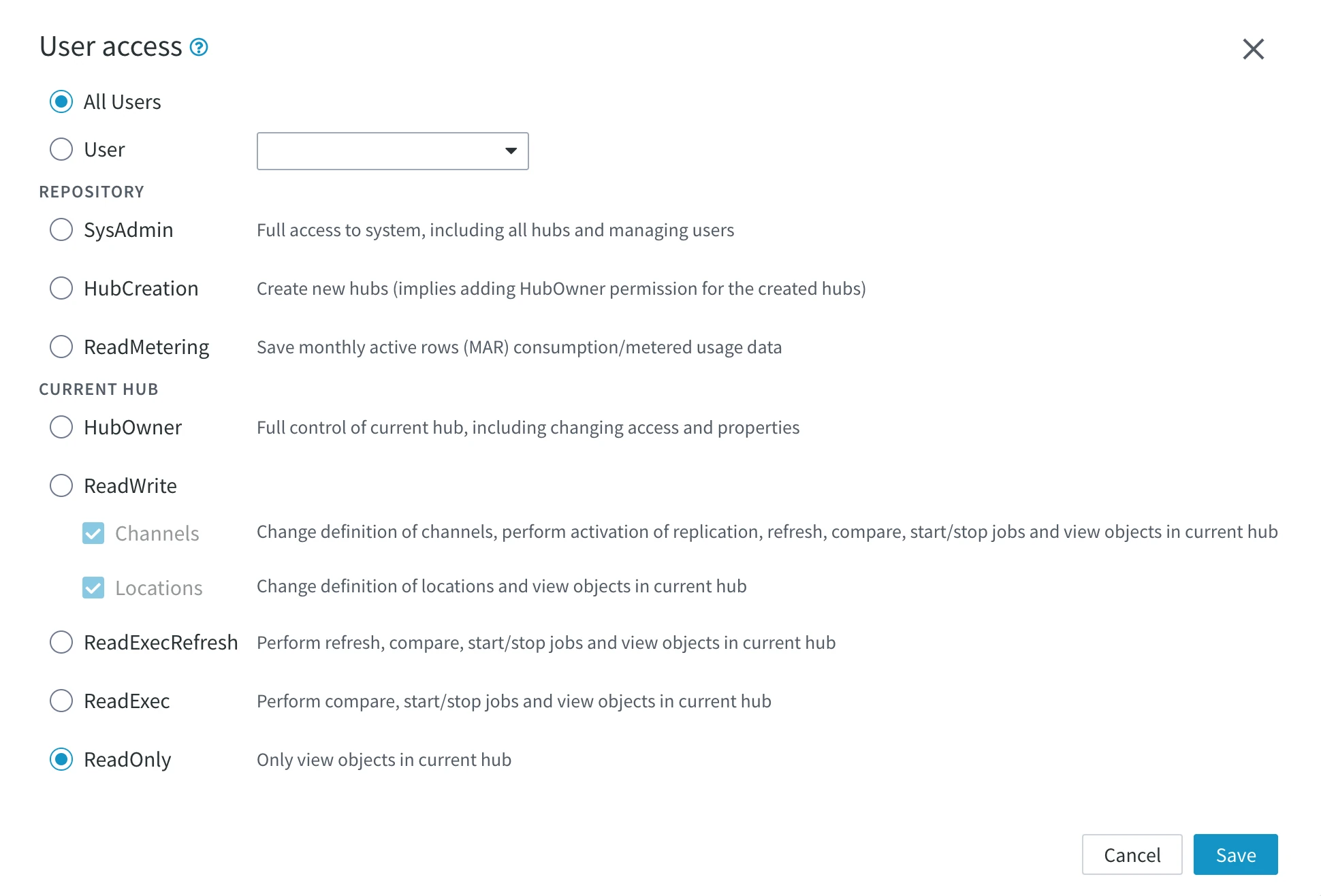
In the User access dialog, choose whether to assign the permission to:
- All Users: Assign the permission to all users. A newly user created will inherit this access permission by default.
- User: Assign the permission to a specific user. Select the user from the drop-down list.
-
Select a required permission type under the REPOSITORY or CURRENT HUB section.
-
Click Save.