Jobs - DSS 6 | Data Source Solutions Documentation
Documentation: Jobs - DSS 6 | Data Source Solutions Documentation
Jobs
Job is a process that performs a particular task, such as capturing changes, refreshing data, integrating changes, comparing data, etc. At any moment a job has a specific state. Jobs are managed by the Scheduler. Jobs running through the Scheduler have their output appended to the hub log, and in case of a job failure, the hub will automatically retry the job.
Job States
At any moment a job is in a certain state. Jobs can be either acyclic or cyclic. Acyclic jobs will only run once, whereas cyclic jobs will rerun repeatedly. When a cyclic job runs, it goes from state PENDING to RUNNING and then back to state PENDING. In this state it waits to receive a signal (trigger) in order to run again. When an acyclic job runs, it goes from state PENDING to RUNNING and then disappears.
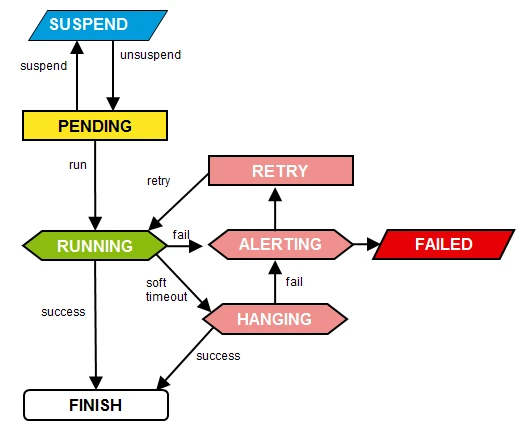
A job can be in one of the following states:
- ALERTING: If a job fails to run successfully, the Scheduler will change its state first to ALERTING, then RETRY, and will eventually run again.
- DISABLED: If a job is in DISABLED state, it cannot be resumed, as opposed to SUSPENDED.
- DONE: For activate, refresh and compare jobs, this state indicates that the most recent event of the corresponding type has been completed.
- ERROR: Error(s) occurred during job execution.
- FAILED: Job execution is canceled.
- HANGING: If a job stays in state RUNNING for too long, it may be marked with state HANGING; if it finishes successfully, it will become PENDING.
- PENDING: Job is yet to be executed.
- READY: Job execution is completed.
- RETRY: Job failed and is restarted at least once during the job processing.
- RUNNING: Job execution is in progress.
- SUSPENDED: Job execution is paused and can be unsuspended, which means that it will go into a PENDING or RUNNING state.
- WAITING: Job will run at a scheduled time.
Event-driven Jobs
Tasks like activate, compare, and refresh can take significant time to execute. Such tasks are not feasible to implement as a single REST endpoint, where the corresponding HTTP request would just run for hours. Instead, these tasks run as event-driven jobs in the background. They work as follows:
- To perform one of these tasks, first a corresponding event is created (through REST API or CLI).
- This event is inserted into the DSS_EVENT repository table.
- The event has an associated job (e.g. mychn-activate) stored in the job_name column. This job is automatically created in the Scheduler during the event creation.
- Once the associated job is started, it queries for corresponding ACTIVE events (from the ev_state column) and executes the event if it finds some.
Viewing and Managing Jobs
DSS offers the following methods for viewing and managing jobs:
- via UI - see Jobs
- via CLI - see dssjobconfig, dssstart, and dsssuspend
- via API - see Job Interface
Job Attributes
Job attributes are used to control when and how jobs are scheduled in the DSS run-time system. Job attributes can be configured using the CLI command dssjobconfig or the UI options Job System Attributes or Job Attributes on the Jobs page.