Troubleshooting Hub Encryption Wallet - DSS 6 | Data Source Solutions Documentation
Documentation: Troubleshooting Hub Encryption Wallet - DSS 6 | Data Source Solutions Documentation
Troubleshooting Hub Encryption Wallet Issues
This section covers various challenges you may encounter with the hub encryption wallet and provides workarounds to resolve them.
Location Connection Failure After Force Disabling the Encryption Wallet
Issue
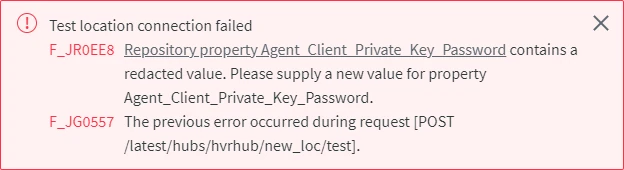
After force disabling the encryption wallet using the command dsswalletconfig -fd, error messages about redacted values may be encountered.

More Error Messages
The following error messages are displayed only whenFew more error messages that may be displayed when values are redacted after force disabling the encryption wallet.

TLS Error Messages
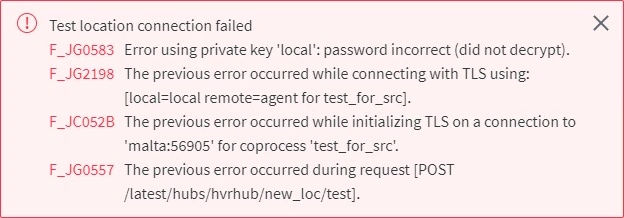
The following error messages are displayed only when locations are configured with DSS Agent and the encryption wallet is force disabled.

Cause
When force disabling a wallet that is in use, all encrypted passwords and keys will be redacted automatically.
Resolution
To resolve this problem, update the redacted location passwords. Also, for locations configured with DSS Agent, all keys and certificates must be regenerated and then the corresponding repository properties must be updated with new values.
-
If the location has agent connection configured, update the keys and certificates, else skip to step 2,
Expand to see the instructions
-
Create a new SSL certificate and key using the command dsssslgen (this must be executed on the machine where the DSS Hub System is installed):
dsssslgen <em>basename</em> "<em>Subject</em>"This command will generate a Public Certificate (basename.pub_cert) and a Private Key (basename.priv_key) files. The command output will also display the Private Key Password, which is required in the next step.
-
Update the following repository properties - Agent_Client_Public_Certificate, Agent_Client_Private_Key, and Agent_Client_Private_Key_Password using the command dssreposconfig:
dssreposconfig Agent_Client_Public_Certificate=@<em>basename</em>.pub_cert Agent_Client_Private_Key=@<em>basename</em>.priv_key Agent_Client_Private_Key_Password=<em>Private_Key_Password</em> -
If access to the agent is limited to certain hub system(s), the client public certificate (Agent_Client_Public_Certificate) of the hub system must be regenerated and updated in the agent property Only_From_Client_Public_Certificates. This can be done either from CLI or UI:
{% tabs %}
{% tab label="CLI" %}
-
Create a public certificate file of the hub system; execute the command dssreposconfig on the hub machine that needs to be added to the allowed list:
Linux:
dssreposconfig 'Agent_Client_Public_Certificate>@<em>file_name</em>.pub_cert'Windows:
dssreposconfig "Agent_Client_Public_Certificate>@<em>file_name</em>.pub_cert" -
Copy the public certificate file (file_name.pub_cert) to the agent machine.
-
Add the public certificate file of the hub system to the allowed list; execute the command dssagentconfig on the agent machine:
Direct CLI:
dssagentconfig Only_From_Client_Public_Certificates.<em>identifier</em>=@<em>file_name</em>.pub_certRemote CLI:
dssagentconfig -R<em>url</em> -h<em>hub</em> -r<em>agent_host</em>:<em>port</em> -L<em>agent_username</em>/<em>password</em> Only_From_Client_Public_Certificates.<em>identifier</em>=@<em>file_name</em>.pub_certidentifier may be replaced with the actual name of the hub (e.g. myhub1) or any name/text to easily identify the allowed hub.
    4. To verify that the public certificate file of the hub system is added to the allowed list, execute the command [**dssagentconfig**](/docs/dss6-command-line-interface-command-reference-dssagentconfig) on the hub machine:

       ```shell
       dssagentconfig -h<em>hub</em> -r<em>agent_host</em>:<em>port</em> -L<em>agent_username</em>/<em>password</em> Only_From_Client_Public_Certificates
       ```

       <div class="callout callout-note">
If the public certificate file of the hub system is successfully added to the allowed list, the command output will display the name and the certificate.
-
-
   {% /tab %}

   {% tab label="UI" %}

   In UI, the **Agent Service Configuration** dialog needs to be accessed for adding the current hub system's client public certificate, for this the agent setup mode must be initiated.

    1. Initiate the agent setup mode using the command [**dssagentconfig**](/docs/dss6-command-line-interface-command-reference-dssagentconfig):
       ```shell
       dssagentconfig Setup_Mode_Timed_Until=now+30m
       ```

       <div class="callout callout-warning">
Initiating setup mode for an agent will terminate all connections to the agent.
In setup mode, the agent does not accept any connections and is not available for any other activities except for agent configuration.
