DbObjectGeneration - DSS 6 | Data Source Solutions Documentation
Documentation: DbObjectGeneration - DSS 6 | Data Source Solutions Documentation
DbObjectGeneration
Action DbObjectGeneration allows control over the database objects which are generated by Data Source Solutions DSS in the replicated databases. The action has no effect other than that of its parameters.
Parameters NoCaptureInsertTrigger, NoCaptureUpdateTrigger, NoCaptureDeleteTrigger, NoCaptureDbProc, NoCaptureTable can either be used to inhibit capturing of changes for trigger-based capture or can be used with parameter IncludeSqlFile to replace the procedures that DSS would normally generate with new procedures containing special logic.
The trigger-based capture method (Capture_Method=DB_TRIGGER) has been deprecated since 6.2.0/0.
Parameters
This section describes the parameters available for action DbObjectGeneration.
Following are the two tabs/ways, which you can use for defining action parameters in this dialog:
- Regular: Allows you to define the required parameters by using the UI elements like checkbox and text field.
- Text: Allows you to define the required parameters by specifying them in the text field. You can also copy-paste the action definitions from DSS documentation, emails, or demo notes.

NoCaptureInsertTrigger
Description: Inhibit generation of capture insert trigger/rule.
NoCaptureUpdateTrigger
Description: Inhibit generation of capture update trigger/rule.
NoCaptureDeleteTrigger
Description: Inhibit generation of capture delete trigger/rule.
NoCaptureDbProc
Description: Inhibit generation of capture database procedures.
NoCaptureTable
Description: Inhibit generation of capture tables for trigger-based capture.
NoIntegrateDbProc
Description: Inhibit generation of integrate database procedures.
IncludeSqlFile
Argument: file
Description: Include file for customizing database objects.
Argument file can be an absolute pathname or a relative path in a directory specified with parameter IncludeSqlDirectory.
If this parameter is defined for any table, then it affects all objects generated for that location.
IncludeSqlDirectory
Argument: dir
Description: Search directory dir for include SQL file.
If this parameter is defined for any table, then it affects all objects generated for that location.
BurstTableStorage
SingleStore
Description: Storage for integrate burst table creation statement.
Available options are:
-
ROW_STORE
default: Creates rowstore tables. -
COLUMN_STORE: Creates columnstore tables.
For more information about rowstore and columnstore tables in SingleStore, refer to the SingleStore documentation.
RefreshTableStorage
SingleStore
Description: Storage for base table creation statement during Refresh.
Available options are:
-
ROW_STORE: Creates rowstore tables.
-
COLUMN_STORE
default: Creates columnstore tables.
For more information about rowstore and columnstore tables in SingleStore, refer to the SingleStore documentation.
CaptureTableCreateClause
Argument: sqlexpression
Description: Clause for capture table creation statement.
StateTableCreateClause
Argument: sqlexpression
Description: Clause for state table creation statement. If this parameter is defined for any table, then it affects all state tables generated for that location.
BurstTableCreateClause
Argument: sqlexpression
Description: Clause for integrate burst table creation statement.
FailTableCreateClause
Argument: sqlexpression
Description: Clause for fail table creation statement. If this parameter is defined for any table, then it affects all tables integrated to that location.
HistoryTableCreateClause
Argument: sqlexpression
Description: Clause for history table creation statement.
RefreshTableCreateClause
Argument: sqlexpression
Description: Clause for base table creation statement during Refresh. Allow all users to access DSS database objects.
RefreshTableGrant
Description: Executes a grant statement on the base table created during Refresh.
Available options are:
-
NONE
default: Do not execute grant statement. -
SELECT_TO_PUBLIC: executes
GRANT SELECT ON <em>table_name</em> TO PUBLIC -
ALL_TO_PUBLIC: executes
GRANT ALL ON <em>table_name</em> TO PUBLIC
The default behavior and available options of this parameter has changed in DSS version 6.1.5/5.
Click here for DSS versions until 6.1.5/5 and all versions in 6.1.0 release
Available options are:
-
NONE (
default, if the table is created in default schema): Do not execute grant statement. -
SELECT_TO_PUBLIC: executes
GRANT SELECT ON <em>table_name</em> TO PUBLIC -
ALL_TO_PUBLIC
default: executesGRANT ALL ON <em>table_name</em> TO PUBLIC
BurstTableSchema
<b>Since:</b> v6.1.5/10
Argument: schema
Description: Defines a schema for storing burst tables, overriding the default schema configuration. The DSS user must have access to this schema.
Changing this value on existing channels leads to undefined behavior.
StateTableSchema
<b>Since:</b> v6.1.5/10
Argument: schema
Description: Defines a schema for storing state tables, overriding the default schema configuration. The DSS user must have access to this schema.
Changing this value on existing channels leads to undefined behavior.
Injecting SQL Include Files
Parameter IncludeSqlFile can be used to inject special logic inside standard SQL which is generated by dssactivate. The SQL that DSS would normally generate can be seen with dssactivate option -S. Conditions (using #ifdef syntax lent from the C preprocessor), control where about this SQL is injected. There are twelve inject points (see diagram below). SQL code will be injected at a specific point depending on the #ifdef conditions specified for macros _INCLUDING_*, _CREATE, _DROP and _TABLE_NAME_*. If a file contains none of these conditions then its content will be injected in all twelve injections points.
These sections will not always be generated:
-
Triggers are only generated for trigger-based capture locations (when Capture_Method is set to DB_TRIGGER).
The trigger-based capture method has been deprecated since 6.2.0/0.
-
Integrate database procedures are only defined if action Integrate is defined with parameter DbProc.
-
The _CREATE section is omitted if dssactivate option -d is defined without -c.
-
Sections for specific tables are omitted if dssactivate option -t is specified for different tables.
-
Database procedures are only generated if dssactivate option -op is defined or no -o option is supplied.
-
Database procedures and triggers are only generated if dssactivate option -ot is defined or no -o option is supplied.
The trigger-based capture method (Capture_Method=DB_TRIGGER) has been deprecated since 6.2.0/0.

The following macros are defined by dssactivate for the contents of the file specified by parameter IncludeSqlFile. These can also be used with #if or #ifdef directives.
Macro Description _CREATE Defined when dssactivate is creating database objects. _DB_CAPTURE Defined if action Capture is defined on this location. _DB_INTEGRATE Defined if action Integrate is defined on this location. _DBPROC_COL_NAMES Contains the list of columns in the base table, separated by commas. _DBPROC_COL_VALS Contains the list of values in the base table, separated by commas. _DBPROC_KEY_EQ Contains where condition to join database procedure parameters to the key columns of the base table. For example, if the table has keys (k1, k2), then this macro will have value k1=k1$ and k2=k2$. _DROP Defined when dssactivate is dropping database objects. _FLAG_OC Defined when dssactivate option -oc or no -o option is supplied. _FLAG_OP Defined when dssactivate option -op or no -o option is supplied. _FLAG_OS Defined when dssactivate option -os or no -o option is supplied. _FLAG_OT Defined when dssactivate option -ot or no -o option is supplied. _DSS_VER DSS version number. _DSS_OP_VAL Defined when _INCLUDING_INTEG_DBPROC_* is defined with value 0, 1 or 2. It means the current database procedure is for delete, insert or update respectively. _INCLUDING_BEGIN Defined when dssactivate is including the SQL file at the beginning of its SQL. _INCLUDING_END Defined when dssactivate is including the SQL file at the end of its SQL. _INCLUDING_CAP_DBPROC_BEGIN Defined when dssactivate is including the SQL file at the beginning of each capture database procedure. _INCLUDING_CAP_DBPROC_DECLARE Defined when dssactivate is including the SQL file for the declare block of each capture database procedure. _INCLUDING_CAP_DBPROC_END Defined when dssactivate is including the SQL file at the end of each capture database procedure. _INCLUDING_INTEG_DBPROC_BEGIN Defined when dssactivate is including the SQL file at the beginning of each integrate database procedure. _INCLUDING_INTEG_DBPROC_DECLARE Defined when dssactivate is including the SQL file for the declare block of each integrate database procedure. _INCLUDING_INTEG_DBPROC_END Defined when dssactivate is including the SQL file at the end of each integrate database procedure. _INCLUDING_OVERRIDE_BEGIN Defined as dssactivate is including the SQL file at a point where database objects can be dropped or created. Each SQL statement in this section must be preceded by macro _SQL_BEGIN and terminated with macro _SQL_END. _INCLUDING_OVERRIDE_END Defined as dssactivate is including the SQL file at a point where database objects can be dropped or created. Each SQL statement in this section must be preceded by macro _SQL_BEGIN and terminated with macro _SQL_END. _INGRES Defined when the current location is an Ingres database. _LOC_DBNAME Database name. _LOC_NAME Name of current location. _ORACLE Defined when the current location is an Oracle database. TBL_NAME_X Indicates that a database procedure for table x is generated. This macro is only defined when _INCLUDING_*_DBPROC_* is defined. _SQL_BEGIN Macro marking the beginning of an SQL statement in a section for _INCLUDING_OVERRIDE. _SQL_END Macro marking the end of an SQL statement for an _INCLUDING_OVERRIDE section. _SQLSERVER Defined when the current location is an SQL Server database.
Examples
This section describes examples of using various parameters of DbObjectGeneration.
Example 1. Replicate updates to column as differences, instead of as absolute values
The following example replicates updates to column balance of table account as differences, instead of as absolute values. The channel should contain the following actions: Capture (not log-based), Integrate with parameter DbProc (at least for this table) and DbObjectGeneration with parameter IncludeSqlFile=inject.sql.
#ifdef _TBL_NAME_ACCOUNT
  #ifdef _INCLUDING_CAP_DBPROC_BEGIN
    /* DSS will inject this SQL at the top of capture dbproc account__c */
    /* Note: old value is in <balance>, new value is <balance_> */
    if dss_op = 2 then /* dss_op = 2 means update */
      balance_ = balance_ - balance;
    endif;
  #endif

  #if defined _INCLUDING_INTEG_DBPROC_BEGIN && _DSS_OP_VAL == 2
    /* DSS will inject this SQL at the top of integ dbproc account__iu */
    select balance = balance + :balance
    from account
    where account_num = :account_num;
  #endif
#endif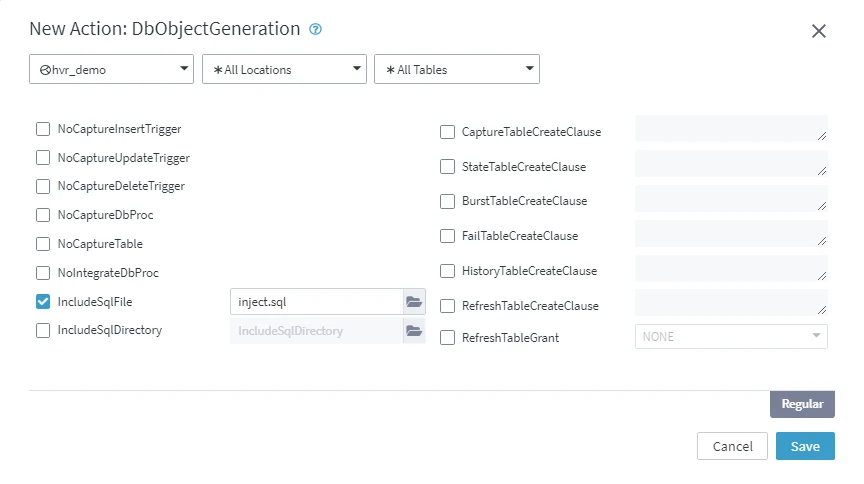
Example 2. Capture changes from SQL views
The following example is a channel that captures changes from SQL views, which are supplied by the end user in file include_view.sql. The channel defines the Capture for trigger-based capture, but then uses action DbObjectGeneration to disable automatic generation of all the trigger-based capture objects. Instead it uses parameter IncludeSqlFile to create a pair of capture views.
The trigger-based capture method (Capture_Method=DB_TRIGGER) has been deprecated since 6.2.0/0.
#if defined _FLAG_OC && defined _DB_CAPTURE
  #ifdef _DROP
    #ifdef _INCLUDING_BEGIN
      _SQL_BEGIN_DROP
      drop view dm01_order__c0
      _SQL_END
      _SQL_BEGIN_DROP
      drop view dm01_order__c1
      _SQL_END
    #endif
  #endif

  #ifdef _CREATE
    #ifdef _INCLUDING_END
      _SQL_BEGIN
      create view dm01_order__c0 as
        select ' ' as dss_tx_id,
               1 as dss_op,
        #ifdef _ORACLE
               1 as dss_seq,
               sysdate as dss_cap_tstamp,
        #endif
        #ifdef _INGRES
               byte('', 8) as dss_seq,
               date('now') as dss_cap_tstamp,
        #endif
        #ifdef _SQLSERVER
               cast(1 as binary(8)) as dss_seq,
               ' ' as dss_cap_tstamp,
        #endif
               user as dss_cap_user, dm01_order.prod_id, dm01_order.ord_id,
               dm01_order.cust_name, dm01_order.cust_addr, dm01_product.prod_price,
               dm01_product.prod_descrip
        from   dm01_order, dm01_product, dss_togdss_demo01
        where  dm01_order.prod_id = dm01_product.prod_id
          and  dm01_order.order_date >= dss_togdss_demo01.cap_begin_prev
          and  dm01_order.order_date < dss_togdss_demo01.cap_begin
      _SQL_END

      _SQL_BEGIN
      create view dm01_order__c1 as select * from dm01_order__c0
      _SQL_END
    #endif
  #endif
#endif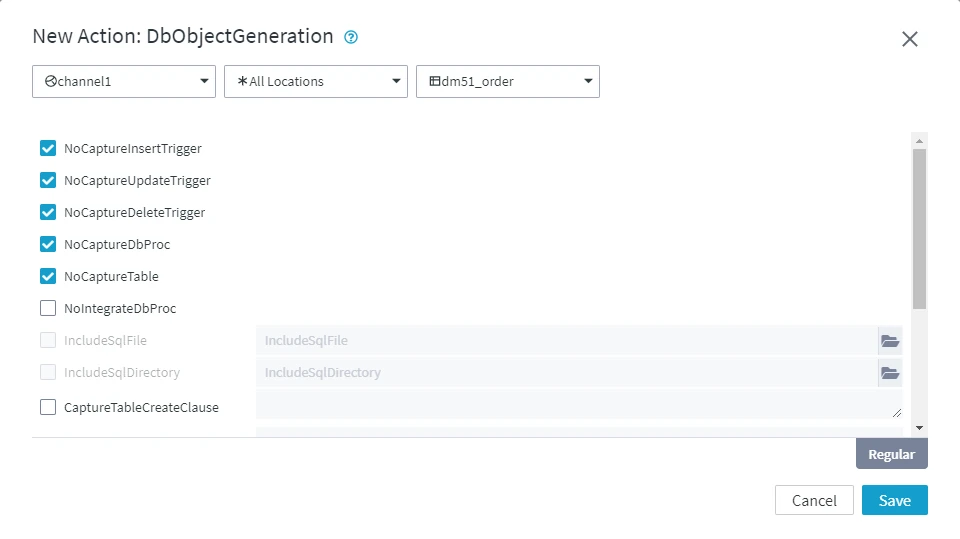
-
If long data types are needed (such as Oracle clob or SQL Server text) then these should be excluded from the capture view but still registered in the DSS repository tables; the DSS capture job will then do a select with an outer-join to the base table (which could also be a view).
-
Commands dsscompare and dssrefresh can also have views on the 'read' side instead of regular tables. If action Integrate with parameter DbProc is defined then row-wise refresh can also select from a view on the 'write' side before applying changes using a database procedure.
-
-