Capture from Oracle using BFile - DSS 6 | Data Source Solutions Documentation
Documentation: Capture from Oracle using BFile - DSS 6 | Data Source Solutions Documentation
Capture From Oracle Using BFile
<b>Since</b> v6.1.0/2
In the BFile capture method, Data Source Solutions DSS reads Oracle's redo and archive log files through directory objects. DSS first tries to access the redo or archive log files through the existing directory objects or creates a new directory object if it does not exist.
This method is comparable in speed with the DIRECT and LOGMINER capture methods.
The BFile method does not require the DSS Agent to be installed on the source database machine.
Accessing Predefined Directories
Directories for online redo and archive files are predefined. A DBA must create directory objects and grant read access to the DSS user. DSS will automatically find and use the created directory objects.
Permissions for Accessing the Predefined Directories
- Oracle minimal permission on directory objects: READ
- OS minimal permission for Oracle user: READ
Log Directories Mapping
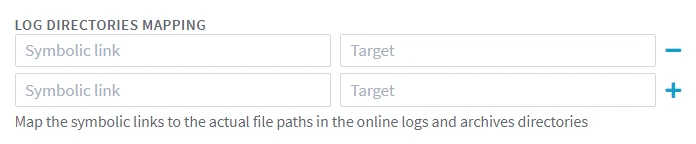
The LOG DIRECTORIES MAPPING fields in the user interface (equivalent to location property Oracle_BFile_Dirs_Mapping) should only be filled in if the file paths of the online logs or archive directories include symbolic links. This is necessary because Oracle does not allow access through the BFile interface to a directory that has symbolic links in its path.
For example, there is a log directory /var/foo/xxx, where /var/foo/ is a symbolic link to path /yyy/zzz. Thus, the real path to the wallet directory is /yyy/zzz/xxx. In this case, /var/foo should be specified in the Symbolic link field and /yyy/zzz should be specified in the Target field.
Fast Recovery Area Access
The Oracle Fast Recovery Area is a set of directories for storing files related to the recovery process. It includes the directory for saving archive files. However, since Oracle creates a new sub-directory for archives every day, it would be necessary to create a new directory object and grant read access to the DSS user every day. To avoid this, DSS automatically creates a new directory object and drops the existing ones.
For DSS to automatically rotate directory objects, the following grants must be provided to the DSS user:
GRANT CREATE ANY DIRECTORY TO <em>username</em>;
GRANT DROP ANY DIRECTORY TO <em>username</em>;
Reduced Permissions for BFile Capture Method
In cases where the above permissions are deemed excessive, you can reduce them by using a custom package DSS_BFILE, specifically designed to operate with owner privileges. The DBA is required to run the package script and grant execution to the DSS user.
Here is the body of the DSS_BFILE package:
CREATE OR REPLACE PACKAGE DSS_BFILE AUTHID DEFINER AS
    PROCEDURE dir_create(dirobj_name VARCHAR2, directory_name VARCHAR2);
    PROCEDURE dir_remove(dirobj_name VARCHAR2);
END DSS_BFILE;
/

CREATE OR REPLACE PACKAGE BODY DSS_BFILE AS
   PROCEDURE dir_create(dirobj_name VARCHAR2, directory_name VARCHAR2) IS
   user_id VARCHAR2(256);
   BEGIN
      EXECUTE IMMEDIATE 'CREATE OR REPLACE DIRECTORY ' || dir_create.dirobj_name || ' AS ''' || dir_create.directory_name || '''';
      user_id := USER;
      -- If you are not on the ASM system, you can reduce the permission to 'GRANT READ on DIRECTORY'.
      EXECUTE IMMEDIATE 'GRANT READ ON DIRECTORY ' || dir_create.dirobj_name || ' TO ' || user_id;
   END;
PROCEDURE dir_remove(dirobj_name VARCHAR2) IS
   BEGIN
      EXECUTE IMMEDIATE 'DROP DIRECTORY ' || dir_remove.dirobj_name;
   END;
END DSS_BFILE;
/

CREATE OR REPLACE PUBLIC SYNONYM PKG_DSS_BFILE FOR SYS.DSS_BFILE;
Grant the necessary execution privilege to the DSS user:
GRANT EXECUTE ON PKG_DSS_BFILE TO <em>username</em>;
Amazon RDS for Oracle
-
To access online and archived redo log files, create Oracle directory objects using the RDS administration package. Run the following commands as a privileged user (such as
rdsadmin). These will create onlinelog_dir and archivelog_dir directories used to reference physical redo and archive log files:BEGIN rdsadmin.rdsadmin_master_util.create_onlinelog_dir; rdsadmin.rdsadmin_master_util.create_archivelog_dir; END; / -
Grant read access on the created directories to your DSS database user by running the following commands:
Replace username with your actual DSS database username, matching its exact case - use uppercase if the user was created without quotes, or preserve the exact case if created with double quotes.
GRANT READ ON DIRECTORY onlinelog_dir TO <em>username</em>; GRANT READ ON DIRECTORY archivelog_dir TO <em>username</em>;-
Enable supplemental logging on Amazon RDS for Oracle by running the following command:
Replace username with your actual DSS database username, matching its exact case - use uppercase if the user was created without quotes, or preserve the exact case if created with double quotes.
BEGIN rdsadmin.rdsadmin_util.grant_sys_object( p_obj_name => 'V_$SESSION', p_grantee => '<em>username</em>', p_privilege => 'SELECT'); END; /-
Enable supplemental logging at the database level by running the following command:
BEGIN rdsadmin.rdsadmin_util.alter_supplemental_logging( p_action => 'ADD'); END; / -
Enable supplemental logging for the primary key columns of each table you plan to replicate.
Replace tablename with the name of your table. Repeat for each relevant table involved in replication.
ALTER TABLE <em>tablename</em> ADD SUPPLEMENTAL LOG DATA (PRIMARY KEY) COLUMNS;Capturing Archive Logs on Oracle with ASM Storage
DSS supports capture from Oracle database using ASM to store archive files remotely through Bfile. The files are copied to the local file system on the database server, read, and then deleted. To copy and delete the files, the following grants are required:
GRANT EXECUTE ON sys.dbms_file_transfer TO <em>username</em>;
GRANT EXECUTE ON sys.utl_file TO <em>username</em>;
If you used granular dictionary privileges instead of the
GRANT SELECT ANY DICTIONARYprivilege, then the following additional privileges are also required:GRANT SELECT ON sys.v_$session_longops TO <em>username</em>; GRANT SELECT ON sys.v_$mystat TO <em>username</em>;To capture from Oracle with ASM storage using BFile capture method, perform the following steps:
BFILE_PATH
- A DBA must create or provide an existent directory on a file system and grant read and write access to the DSS database user. On a RAC system, this location can be local to the node, irrespective of whether connectivity is directly to the node or through the scan listener. The path to the local directory on a RAC system must be identical on all nodes.
ASM_DST_ALIAS
- A DBA can create a directory object for the BFILE_PATH directory and grant read and write access to the DSS user. DSS will automatically create a directory object if one has not been provided. In this case, the
CREATE ANY DIRECTORYprivilege must also be granted. This alias must be unique for each DSS channel, for each database instance. In the case of a single channel, this step can be omitted and DSS will use the default generated directory name.
ASM_SRC_ALIAS
- In order to access the archived log files directly in the respective daily folders, the DSS database user must have been granted the
CREATE AND DROP ANY DIRECTORYprivilege. The directory alias must be unique for each DSS channel, for each database instance.
Action Definition
The following actions must be defined:
Group Table Action Type Parameter(s) ORACLESRC * Environment Mandatory Name=DSS_ORA_BFILE_ASM_PATH Value=BFILE_PATH ORACLESRC * Environment Optional Name=DSS_ORA_BFILE_ASM_DST_ALIAS Value=ASM_DST_ALIAS ORACLESRC * Environment Optional Name=DSS_ORA_BFILE_ASM_SRC_ALIAS Value=ASM_SRC_ALIAS Capturing Online Logs on Oracle with ASM Storage
Online logs are not currently supported directly by BFile capture method. Capturing from online logs requires DIRECT method with configured access to an underlying ASM system, local on the database server or remote over TNS. Also it is possible to configure a short interval of log switching on the database side to limit capture latency.
BFile Capture Method Limitations
- Archived Log Only mode is not supported when using the BFile capture method (except implicitly when capturing from an Oracle Database using ASM storage)
-
-