Capture from Oracle ASM - DSS 6 | Data Source Solutions Documentation
Documentation: Capture from Oracle ASM - DSS 6 | Data Source Solutions Documentation
Capture from Oracle ASM
Data Source Solutions DSS supports log-based capture from Oracle databases whose redo and archive files are located on the Oracle Automatic Storage Management (ASM). Capture from Oracle ASM is supported only when the capture method is Direct Redo Access. Note that, you can also remotely connect to Oracle ASM without installing an DSS Agent on the source database machine.
DSS uses the dbms_diskgroup package to access ASM files for direct capture (Capture_Method=DIRECT).
The Location Property equivalent to the UI field is shown inside (bracket) below.
For connecting to the Oracle ASM instance, the connection parameters ASM USER (Oracle_ASM_User) and PASSWORD (Oracle_ASM_Password) must be specified. The user defined in ASM USER field must have sufficient privileges on the ASM instance; sysdba for Oracle version 10 and sysasm for Oracle 11+.
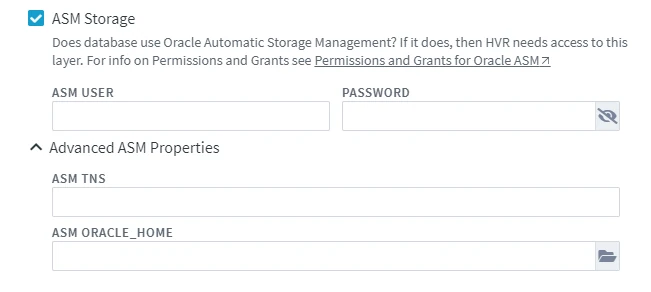
- If the ASM is only reachable through a TNS connection, the connection string must be specified in the advanced property ASM TNS (Oracle_ASM_TNS).
- If DSS is not able to get the correct value for the ORACLE_HOME of the ASM instance (e.g. by looking into /etc/oratab), then that path should be defined using the advanced property ASM ORACLE_HOME (Oracle_ASM_Home).
Operating System User Requirements
The operating system (OS) user must belong to the default ASM group (typically "grid") to access ASM files directly.
{% tabs %}
{% tab label="Linux" %}
To add a group with a specific user ID, run the following command:
sudo groupadd -g <em>userID</em> grid
To set the "grid" group as the default group for the OS user, run the following command:
sudo usermod -g <em>userID</em> grid
{% /tab %}
{% tab label="Windows" %}
-
Create a new local group (alternatively, use an existing group):
net localgroup grid /add -
Add the OS user to the group:
net localgroup grid <em>os_user</em> /add
{% /tab %}
{% /tabs %}
DBLOGREADER API for ASM
If you have an Oracle GoldenGate license, DSS can use the Oracle DBLOGREADER API for ASM. For more information, refer to Oracle documentation.
The following action definition is required for using this:
| Group | Table | Action | Parameters |
|---|---|---|---|
| Oracle | * | Environment | Name=DSS_ORA_REDO_ASM, Value=OCI |
Grants for Capturing from Oracle ASM
The DSS database User must have the privileges mentioned in section Grants for Log-Based Capture and additionally the following privileges for capturing from Oracle ASM:
grant select on sys.v_$asm_diskgroup_stat to <em>username</em>;

grant select on sys.v_$asm_client to <em>username</em>;