Azure SQL Database Requirements - DSS 6 | Data Source Solutions Documentation
Documentation: Azure SQL Database Requirements - DSS 6 | Data Source Solutions Documentation
Azure SQL Database Requirements
This section describes the requirements, access privileges, and other features of Data Source Solutions DSS when using Azure SQL Database for replication. Azure SQL Database is the Platform as a Service (PaaS) database of Microsoft's Azure Cloud Platform.
Supported Platforms
- Learn about the Azure SQL Database versions compatible with DSS on our Platform Support Matrix page (6.1.0, 6.1.5, 6.2.0, and 6.2.5).
Supported Capabilities
- Discover what DSS offers for Azure SQL Database on our Capabilities for Azure SQL Database page (6.1.0, 6.1.5, 6.2.0, and 6.2.5).
Data Management
- Learn how DSS maps data types between source and target DBMSes or file systems on the Data Type Mapping page. For the list of supported Azure SQL Database data types and their mapping, see Data Type Mapping for Azure SQL Database.
Data Source Solutions provides additional solutions for replicating data from Azure SQL Database. For more information, see section SQL Server in Databases.
ODBC Connection
Microsoft SQL Server Native Client ODBC driver must be installed on the machine from which DSS connects to Azure SQL Database. For more information about downloading and installing SQL Server Native Client, refer to Microsoft documentation.
DSS uses the SQL Server Native Client ODBC driver to connect, read and write data into Azure SQL Database during Capture, Continuous Integrate, and Row-wise Refresh. The connection to the Azure SQL Database is encrypted by default (DSS will always add the “ENCRYPT=YES” to connection string for any Azure SQL connection).
For information about the supported ODBC driver version, refer to the DSS release notes (dss.rel) available in the DSS_HOME directory or the downloads page.
Firewall Configuration
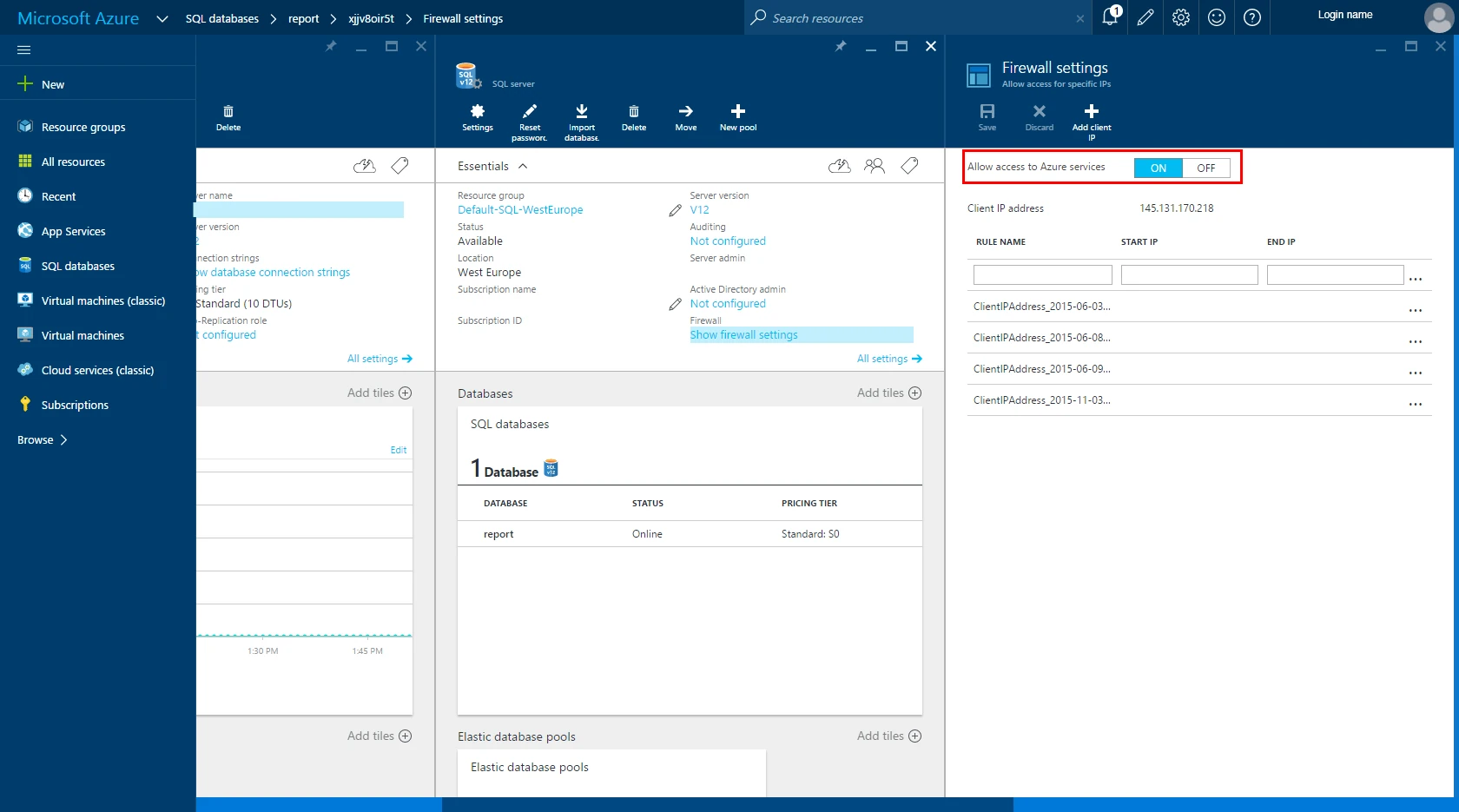
The Azure SQL Database server has a firewall setting that prevents incoming connections by default. However, this can be configured/changed under Database server/Show firewall settings. To allow access to the Azure services, when connecting from an Azure VM (through an agent), set option Allow access to Azure services to ON.
When connecting directly from an on-premises hub, add the DSS Hub Server's IP address to the allowed range. For more information about adding your server to the allowed IP address list, refer to the Azure SQL Database documentation.
Authentication Methods
DSS supports the following authentication methods for connecting to Azure SQL database:
-
SQL authentication (Username and Password): This method uses SQL authentication to connect to Azure SQL Database. The connection parameters required for this authentication method are:
- USER: User name and host name of the Azure SQL Database server.
- PASSWORD: The password for the SQL Server account.
-
Service-to-Service (Access Token): This method is used if an application needs to directly authenticate itself with Azure SQL Database using OAuth 2.0. The connection parameters required for this authentication method are:
- OAUTH2 ENDPOINT: The OAuth 2.0 token endpoint URL.
- CLIENT ID: The client ID of the Azure Entra ID application.
- CLIENT SECRET KEY: The client secret of the Azure application.
This method is useful for applications that need to authenticate programmatically. For more information on service-to-service authentication, refer to Application and service principal authentication in Microsoft's documentation.
-
Microsoft Entra ID (Azure Active Directory): This method uses Azure Active Directory (Azure AD / Azure Entra ID) authentication to connect to Azure SQL Database. The connection parameters required for this authentication method are:
- Azure_OAuth2_User: The Azure AD username.
- Azure_OAuth2_Password: The Azure AD user's password.