Architecture - DSS 6 | Data Source Solutions Documentation
Documentation: Architecture - DSS 6 | Data Source Solutions Documentation
Architecture
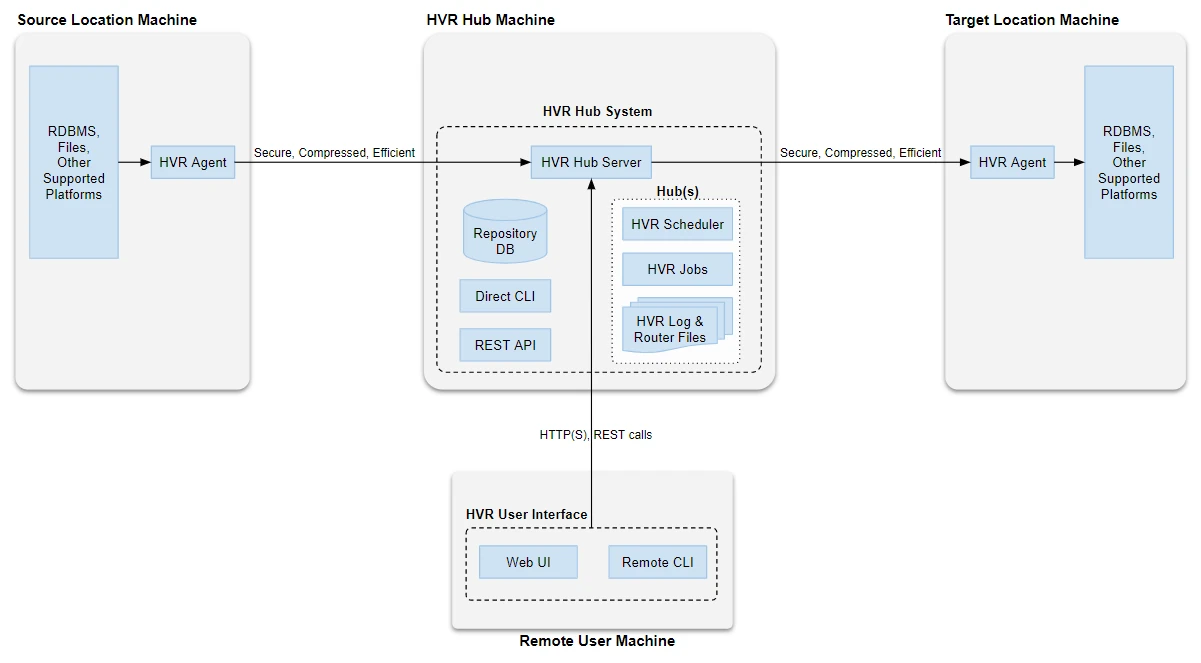
Data Source Solutions DSS may be installed on the most commonly used operating systems. DSS reads the transaction logs of the source location(s) in real time. That data is then compressed, optionally encrypted, and sent to a 'hub machine'. The hub system then routes the data and integrates (applies) the data into the target location(s).
Location
A location is a storage place (for example, database or file storage) from where DSS captures changes (source location) and/or integrates changes (target location).
DSS Hub System
The DSS Hub System is an installation of DSS on a server, which orchestrates replication in logical entities called channels. The DSS Hub Server is supported or can be installed only on Linux and Windows machines (physical, virtual or containerized).
The DSS Hub System comprises the following elements:
- DSS Hub Server
This is the main DSS process that runs on the hub machine. Its main two purposes are to run a light-weight web server to enable access to the REST API, and it is responsible for managing the Scheduler. When required the hub server process spawns child processes like the Scheduler and DSS worker (executable). The hub server can serve one or more Hubs (logical hub). The DSS Hub Server is also the access point for any remote connection to the DSS Hub System. - Repository Database
The repository database consists of a set of tables storing metadata definitions for the replication between source and target locations. The repository database contains DSS repository tables that hold all specifications of replication such as the name of replicated databases, replication direction, and the list of tables to be replicated. For the list of databases that DSS supports as a repository database, see section Repository Database in Capabilities. - Hub
This is a logical entity that is created inside the DSS Hub System. If multiple hubs are created inside the DSS Hub System, then the Hub server will spawn separate Schedulers for each hub created. - Jobs
In DSS, a job is a process that performs a certain task such as capturing changes, refreshing data, integrating changes, comparing data. For more information about DSS jobs, see the concept page Jobs. - Scheduler
The DSS Hub Server runs a Scheduler service to manage replication jobs (like Capture, Integrate, Refresh, and Compare jobs) that move data between source location(s) and target location(s). To either capture or integrate changes, the Scheduler on the hub machine starts the capture and integrate jobs that connect out to source and target locations. For each logical hub, the DSS Hub Server creates and runs separate Scheduler. - Log Files
The log files contain messages from the scheduled jobs like Capture, Integrate, Refresh, and Compare jobs. It provides details about the activities like transport, routing and integration. The DSS Hub Server logs information about the hub server itself. For each logical hub, DSS Hub Server creates and maintains separate set of log files. - Router Files
Router files are the files that DSS Hub Server creates internally to store a history of what DSS had captured and submitted for integration, including the information about timestamps, states of the capture and integrate jobs, transactions, channels, locations, tables, instructions for a replication job, etc. For each logical hub, DSS Hub Server creates and maintains a separate set of router files.
The DSS Hub System can also be configured to work as a DSS Agent to capture or integrate changes.
DSS Agent
The DSS Agent is an installation on a remote source and/or target machine that allows to implement a distributed setup. The DSS Agent acts as a child process for the hub system/machine. To access a remote location, the DSS Hub System normally connects securely (using TLS) to the DSS Agent using a special TCP/IP port number. The DSS Agent is supported or can be installed only on Linux, Unix (Solaris, AIX), and Windows machines.
Even though we recommend using the DSS Agent with the distributed setup, DSS can also support an agent-less architecture. DSS can connect directly (without using agent) to a remote database location using a DBMS protocol such as Oracle TNS.
For more information about DSS Agent, see the concept page DSS Agent.
Interface for Operating DSS
A user can operate or interact with DSS using either of the following interfaces:
Web UI
The web UI is an intuitive and responsive graphical user experience for configuring/operating DSS. It also provides a comprehensive visualization of replication (capture and integrate) along with dashboard and event log viewer. It can be used on both computer and tablet screens. DSS web UI is commonly referred to as 'UI' in this documentation.
For more information about DSS web UI, see User Interface.
Command Line Interface (CLI)
DSS can be configured/operated from the command line (e.g. Linux shell or Windows command prompt) using DSS commands. DSS CLI can be accessed directly on the hub machine or from a remote machine (provided a DSS installation is available on the remote machine). Without a DSS installation, the client can still make REST calls (e.g. using CURL or some other utility/tools).
For more information about DSS CLI, see Command Line Interface.
REST API
The REST APIs are provided for advanced users who want to script DSS interactions, and for developers who want to integrate DSS into their application. For more information about DSS REST interface, see REST API.